

Designing Robust FilterObject Queries in Oracle REST Data Services

APIs play a vital role in making easy communication between applications and databases. Oracle REST Data Services (ORDS) offers a robust solution for creating RESTful web services that work with Oracle databases. A nice feature provided by ORDS is the FilterObject where developers can optimize data retrieval by applying filtering conditions directly to API endpoints. In this blog post, we will explore its usage with some examples.
FilterObject Syntax
The FilterObject syntax follows a simple and intuitive format. It comprises three main components:
Column Name: Specifies the name of the database column on which the filtering will be applied.
Operator: Defines the filtering operation to be performed, such as equals, greater than, less than, etc.
Value: Represents the value used for comparison.
Using these components, developers can construct complex filter expressions to cater to various filtering requirements.
FilterObject in Action
Suppose we have an endpoint to retrieve employee data from the emp table. We can use the FilterObject to fetch employees with a specific job title, salary range, or any other relevant criterion.
To run the examples we are going to see next, we can use the following code and table below.
declare
  l_clob    clob;
begin
  l_clob := apex_web_service.make_rest_request (
                p_url         => 'https://<your_server>/ords/<workspace>/hr/employees/',
                p_http_method => 'GET');

  dbms_output.put_line(l_clob);

end;
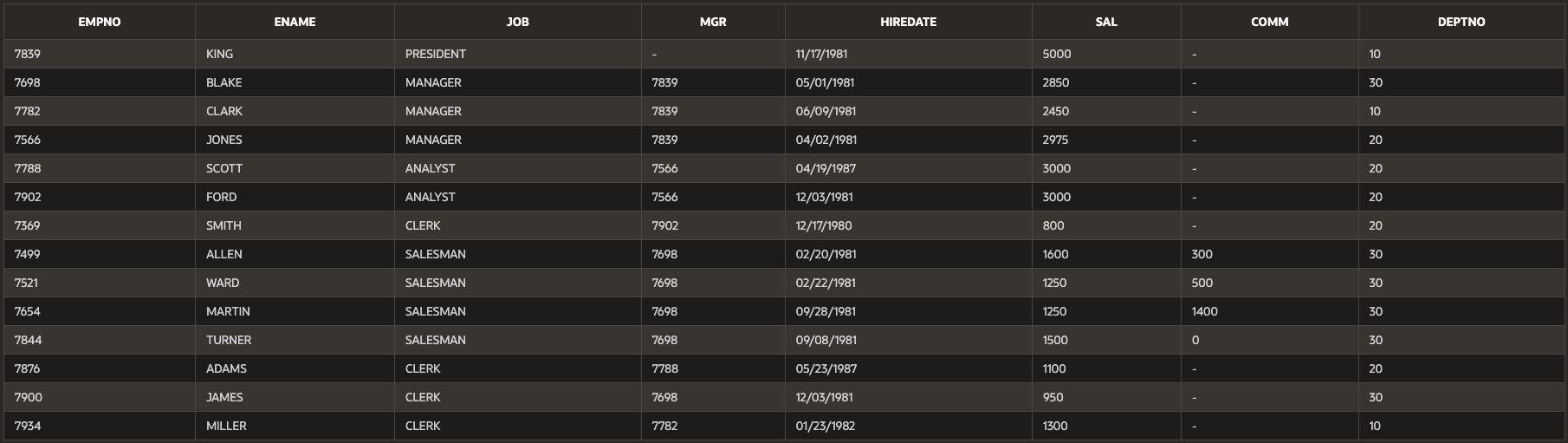
- Equal ($eq): Supports number, string and dates. The equal filter could be used implicit and explicit.
-- returns employee named KING (= 'KING')
-- implicit
https://<your_server>/ords/<workspace>/hr/employees/?q={"ename":"KING"}
-- explicit
https://<your_server>/ords/<workspace>/hr/employees/?q={"ename":{"$eq":"KING"}}
Note: This filtering is case-sensitive when used with strings
- Not Equal ($ne): Supports number, string and dates.
-- returns all employees but KING (!= 'KING')
https://<your_server>/ords/<workspace>/hr/employees/?q={"ename":{"$eq":"KING"}}
- Less than (\(lt) / greater than (\)gt): Supports number and dates.
-- returns all employees with salary less than 1000 (< 1000)
https://<your_server>/ords/<workspace>/hr/employees/?q={"sal":{"$lt":1000}}
-- returns all employees with salary greater than 1000 (> 1000)
https://<your_server>/ords/<workspace>/hr/employees/?q={"sal":{"$gt":1000}}
- Less than (\(lte) or equal / greater than or equal (\)gte): Supports number and dates
-- returns all employees with salary less than 1000 (<= 1000)
https://<your_server>/ords/<workspace>/hr/employees/?q={"sal":{"$lte":1000}}
-- returns all employees with salary greater than 1000 (>= 1000)
https://<your_server>/ords/<workspace>/hr/employees/?q={"sal":{"$gte":1000}}
- To search for part of string (\(instr) / not part of string (\)ninstr): Supports string only.
-- returns employees with the letters KI (instr('KI') >0)
https://<your_server>/ords/<workspace>/hr/employees/?q={"ename":{"$instr":"KI"}}
-- returns employees with the letters KI (instr('KI') = 0)
https://<your_server>/ords/<workspace>/hr/employees/?q={"ename":{"$ninstr":"KI"}}
- Like ($like): Supports strings only.
-- returns employees with name ending with K (emp like '%K')
https://<your_server>/ords/<workspace>/hr/employees/?q={"ename":{"$like":"%K"}}
- Between ($between): Supports number, string and dates. We call also use null values for dates and numbers.
-- returns employees with hiredate between 17-MAY-81 and 17-NOV-81 (hiredate between '17-MAY-81' and '17-NOV-81')
https://<your_server>/ords/<workspace>/hr/employees/?q={"HIREDATE":{"$between":["17-MAY-81","17-NOV-81"]}}
-- returns employees with salary lest than 1000 (sal <= 1000)
https://<your_server>/ords/<workspace>/hr/employees/?q={"SAL":{"$between":[null,1000]}}
- Null ($null).
-- returns employees with no comission (COMM is null)
https://<your_server>/ords/<workspace>/hr/employees/?q={"COMM":{"$null":null}}
- And ($and).
-- returns employees with salary equal to 5000 and name starting with K (sal = 5000 and name like 'K%')
https://<your_server>/ords/<workspace>/hr/employees/?q={"SAL":{"\(and":[{"\)eq":5000},{"ename":{"$like":"K%"}}]}}
- Or ($or).
-- returns employees with salary equal to 5000 or 1500 (sal = 5000 or sal = 1500)
https://<your_server>/ords/<workspace>/hr/employees/?q={"SAL":{"\(or":[{"\)eq":5000},{"sal":{"$eq":1500}}]}}
Advantages of Using FilterObject:
Simplified Data Filtering: Simplifies the complexity of data filtering, making it easy for developers to filter queries without the need for complex SQL.
Reduced Network Load: By allowing clients to specify precisely the data they need, unnecessary data transfer is minimized.
Dynamic Filtering: Including FilterObject in the API request enables clients to dynamically adjust filtering criteria based on their specific requirements.


