

JavaScript Inside Oracle Database

Overview
The DBMS_MLE package allows users to execute JavaScript code inside the Oracle Database and exchange data seamlessly between PL/SQL and JavaScript. JavaScript data types are automatically mapped to Oracle Database data types and vice versa.
DBMS_MLE provides a complete solution for using JavaScript inside the Oracle Database. It includes a JavaScript engine, a set of PL/SQL APIs for interacting with JavaScript, and a set of built-in JavaScript modules for interacting with the Oracle Database.
DBMS_MLE Security Model
The DBMS_MLE package uses a security model that is based on Oracle Database privileges. Users must have the the EXECUTE DYNAMIC MLE privilege while calling any of its functions and procedures that pertain to MLE execution.
In addition, the DBMS_MLE subprograms can be executed only by users who have been granted the EXECUTE privilege on an MLE language role (for example, EXECUTE ON JAVASCRIPT) .
Note: The DBMS_MLE is a feature of Oracle Database 21c and higher. If you want to see what kind of MLE languages your database can run, just use the code below
DECLARE
 ctxh   dbms_mle.context_handle_t;
 langs dbms_mle.languages_t;
 i         INTEGER;
BEGIN
  ctxh := dbms_mle.create_context;
  langs := dbms_mle.get_available_languages;

  FOR i IN 1 .. langs.COUNT LOOP
    dbms_output.put_line(langs(i));
  END LOOP;

  dbms_mle.drop_context(ctxh);
END;
/
Why use JavaScript inside PL/SQL
PL/SQL is a powerful language that can probably accomplish most of the things that can be done using Javascript. However, if you have a complex code written in Javascript, it would probably take hours to replicate the logic in PL/SQL if you need to run it inside the database. That's when DBMS_MLE comes in handy and is very helpful.
The code below creates a hash using two parameters, client_id and client_secret and is used to authenticate an API. This is very complex and not easy to replicated using PL/SQL, but in minutes we can put inside the database and make it work.
DECLARE
   ctx dbms_mle.context_handle_t;
   code_snippet clob := q'~
       function SHA1(msg) {
      function rotate_left(n, s) {
        var t4 = (n << s) | (n >>> (32 - s));
        return t4;
      }
      function lsb_hex(val) {
        var str = "";
        var i;
        var vh;
        var vl;
        for (i = 0; i <= 6; i += 2) {
          vh = (val >>> (i * 4 + 4)) & 0x0f;
          vl = (val >>> (i * 4)) & 0x0f;
          str += vh.toString(16) + vl.toString(16);
        }
        return str;
      }
      function cvt_hex(val) {
        var str = "";
        var i;
        var v;
        for (i = 7; i >= 0; i--) {
          v = (val >>> (i * 4)) & 0x0f;
          str += v.toString(16);
        }
        return str;
      }
      function Utf8Encode(string) {
        string = string.replace(/\r\n/g, "\n");
        var utftext = "";
        for (var n = 0; n < string.length; n++) {
          var c = string.charCodeAt(n);
          if (c < 128) {
            utftext += String.fromCharCode(c);
          } else if (c > 127 && c < 2048) {
            utftext += String.fromCharCode((c >> 6) | 192);
            utftext += String.fromCharCode((c & 63) | 128);
          } else {
            utftext += String.fromCharCode((c >> 12) | 224);
            utftext += String.fromCharCode(((c >> 6) & 63) | 128);
            utftext += String.fromCharCode((c & 63) | 128);
          }
        }
        return utftext;
      }
      var blockstart;
      var i, j;
      var W = new Array(80);
      var H0 = 0x67452301;
      var H1 = 0xefcdab89;
      var H2 = 0x98badcfe;
      var H3 = 0x10325476;
      var H4 = 0xc3d2e1f0;
      var A, B, C, D, E;
      var temp;
      msg = Utf8Encode(msg);
      var msg_len = msg.length;
      var word_array = new Array();
      for (i = 0; i < msg_len - 3; i += 4) {
        j =
          (msg.charCodeAt(i) << 24) |
          (msg.charCodeAt(i + 1) << 16) |
          (msg.charCodeAt(i + 2) << 8) |
          msg.charCodeAt(i + 3);
        word_array.push(j);
      }
      switch (msg_len % 4) {
        case 0:
          i = 0x080000000;
          break;
        case 1:
          i = (msg.charCodeAt(msg_len - 1) << 24) | 0x0800000;
          break;
        case 2:
          i =
            (msg.charCodeAt(msg_len - 2) << 24) |
            (msg.charCodeAt(msg_len - 1) << 16) |
            0x08000;
          break;
        case 3:
          i =
            (msg.charCodeAt(msg_len - 3) << 24) |
            (msg.charCodeAt(msg_len - 2) << 16) |
            (msg.charCodeAt(msg_len - 1) << 8) |
            0x80;
          break;
      }
      word_array.push(i);
      while (word_array.length % 16 != 14) word_array.push(0);
      word_array.push(msg_len >>> 29);
      word_array.push((msg_len << 3) & 0x0ffffffff);
      for (blockstart = 0; blockstart < word_array.length; blockstart += 16) {
        for (i = 0; i < 16; i++) W[i] = word_array[blockstart + i];
        for (i = 16; i <= 79; i++)
          W[i] = rotate_left(W[i - 3] ^ W[i - 8] ^ W[i - 14] ^ W[i - 16], 1);
        A = H0;
        B = H1;
        C = H2;
        D = H3;
        E = H4;
        for (i = 0; i <= 19; i++) {
          temp =
            (rotate_left(A, 5) + ((B & C) | (~B & D)) + E + W[i] + 0x5a827999) &
            0x0ffffffff;
          E = D;
          D = C;
          C = rotate_left(B, 30);
          B = A;
          A = temp;
        }
        for (i = 20; i <= 39; i++) {
          temp =
            (rotate_left(A, 5) + (B ^ C ^ D) + E + W[i] + 0x6ed9eba1) &
            0x0ffffffff;
          E = D;
          D = C;
          C = rotate_left(B, 30);
          B = A;
          A = temp;
        }
        for (i = 40; i <= 59; i++) {
          temp =
            (rotate_left(A, 5) +
              ((B & C) | (B & D) | (C & D)) +
              E +
              W[i] +
              0x8f1bbcdc) &
            0x0ffffffff;
          E = D;
          D = C;
          C = rotate_left(B, 30);
          B = A;
          A = temp;
        }
        for (i = 60; i <= 79; i++) {
          temp =
            (rotate_left(A, 5) + (B ^ C ^ D) + E + W[i] + 0xca62c1d6) &
            0x0ffffffff;
          E = D;
          D = C;
          C = rotate_left(B, 30);
          B = A;
          A = temp;
        }
        H0 = (H0 + A) & 0x0ffffffff;
        H1 = (H1 + B) & 0x0ffffffff;
        H2 = (H2 + C) & 0x0ffffffff;
        H3 = (H3 + D) & 0x0ffffffff;
        H4 = (H4 + E) & 0x0ffffffff;
      }
      var temp =
        cvt_hex(H0) + cvt_hex(H1) + cvt_hex(H2) + cvt_hex(H3) + cvt_hex(H4);

      return temp.toLowerCase();
    }

function rot13(str) {
  var input     = "ABCDEFGHIJKLMNOPQRSTUVWXYZabcdefghijklmnopqrstuvwxyz";
  var output    = "NOPQRSTUVWXYZABCDEFGHIJKLMnopqrstuvwxyzabcdefghijklm";
  var index     = x => input.indexOf(x);
  var translate = x => index(x) > -1 ? output[index(x)] : x;
  return str.split('').map(translate).join('');
}

const Base64 = {
// private property
_keyStr : "ABCDEFGHIJKLMNOPQRSTUVWXYZabcdefghijklmnopqrstuvwxyz0123456789+/=",

// public method for encoding
encode : function (input) {
    let output = "";
    let chr1, chr2, chr3, enc1, enc2, enc3, enc4;
    let i = 0;

    input = Base64._utf8_encode(input);

    while (i < input.length) {

        chr1 = input.charCodeAt(i++);
        chr2 = input.charCodeAt(i++);
        chr3 = input.charCodeAt(i++);

        enc1 = chr1 >> 2;
        enc2 = ((chr1 & 3) << 4) | (chr2 >> 4);
        enc3 = ((chr2 & 15) << 2) | (chr3 >> 6);
        enc4 = chr3 & 63;

        if (isNaN(chr2)) {
            enc3 = enc4 = 64;
        } else if (isNaN(chr3)) {
            enc4 = 64;
        }

        output = output +
        Base64._keyStr.charAt(enc1) + Base64._keyStr.charAt(enc2) +
        Base64._keyStr.charAt(enc3) + Base64._keyStr.charAt(enc4);

    }

    return output;
},

// public method for decoding
decode : function (input) {
    let output = "";
    let chr1, chr2, chr3;
    let enc1, enc2, enc3, enc4;
    let i = 0;

    input = input.replace(/[^A-Za-z0-9\+\/\=]/g, "");

    while (i < input.length) {

        enc1 = Base64._keyStr.indexOf(input.charAt(i++));
        enc2 = Base64._keyStr.indexOf(input.charAt(i++));
        enc3 = Base64._keyStr.indexOf(input.charAt(i++));
        enc4 = Base64._keyStr.indexOf(input.charAt(i++));

        chr1 = (enc1 << 2) | (enc2 >> 4);
        chr2 = ((enc2 & 15) << 4) | (enc3 >> 2);
        chr3 = ((enc3 & 3) << 6) | enc4;

        output = output + String.fromCharCode(chr1);

        if (enc3 != 64) {
            output = output + String.fromCharCode(chr2);
        }
        if (enc4 != 64) {
            output = output + String.fromCharCode(chr3);
        }

    }

    output = Base64._utf8_decode(output);

    return output;

},

// private method for UTF-8 encoding
_utf8_encode : function (string) {
    string = string.replace(/\r\n/g,"\n");
    let utftext = "";

    for (let n = 0; n < string.length; n++) {

        let c = string.charCodeAt(n);

        if (c < 128) {
            utftext += String.fromCharCode(c);
        }
        else if((c > 127) && (c < 2048)) {
            utftext += String.fromCharCode((c >> 6) | 192);
            utftext += String.fromCharCode((c & 63) | 128);
        }
        else {
            utftext += String.fromCharCode((c >> 12) | 224);
            utftext += String.fromCharCode(((c >> 6) & 63) | 128);
            utftext += String.fromCharCode((c & 63) | 128);
        }

    }

    return utftext;
},

}

     var encriptKey;
     var bindings = require("mle-js-bindings");
     var clientId = bindings.importValue("clientId");
     var clientSecret = bindings.importValue("clientSecret");


      const sha1hash = SHA1(`${clientId}|${clientSecret}`);


      const timestamp = String(new Date().getTime()).slice(0, 10);
      const seed = `${clientId}|${clientSecret}|${timestamp}|${sha1hash}`;
      const base64 = Base64.encode(seed);

      encriptKey = rot13(base64);

     bindings.exportValue("encriptKey", encriptKey);
   ~';
   l_encriptKey   varchar2(4000);
   l_clientId     varchar2(4000) := '6cec4abd-xxxx-xsce-xxxx-89caxxxx1a09';
   l_clientSecret varchar2(4000) := '1lsy90db99f1acdba9e8fxxx2844354890cxxx8b7211071a29a60fe17ac8b1';

BEGIN

  ctx := dbms_mle.create_context();

  dbms_mle.export_to_mle(ctx, 'clientId', l_clientId);
  dbms_mle.export_to_mle(ctx, 'clientSecret', l_clientSecret);
  dbms_mle.eval(ctx, 'JAVASCRIPT', code_snippet);
  dbms_mle.import_from_mle(ctx, 'encriptKey', l_encriptKey);
  dbms_output.put_line(l_encriptKey);
  dbms_mle.drop_context(ctx);
END;
The dbms_output.put_line will print the hash generated by the javascript.
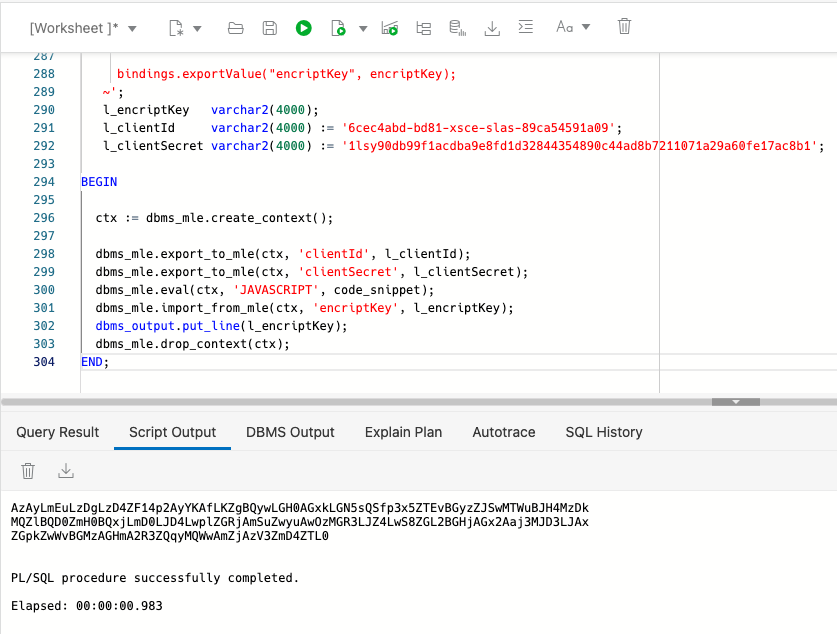
It only took me a few minutes to write the PL/SQL once I understood how to use the DBMS_MLE. Let's take a closer look at what's going on.
dbms_mle.create_context(): This function returns a handle that uniquely identifies a context within a session. We are going to use this context in the next steps.
dbms_mle.export_to_mle: This procedure allow us to pass values from PL/SQL to the context to be used by the javascript
dbms_mle.eval: Like the javascript eval, this procedure will execute the javascript inside the code _snippet.
dbms_mle.import_from_mle: This procedure retrieves value generated by the javascript function to the PL/SQL code.
dbms_mle.drop_context: This procedure will drop the context that was previously created using the CREATE_CONTEXT function.
About the author
- Rodrigo is a Oracle Technical Senior Consultant at Namos Solutions. He is an experienced software engineer with emphasis in analysis, design and development of bespoke Oracle applications utilising development tools such as APEX, PL / SQL, jQuery, javaScript, CSS and JSON for a variety of international businesses. Rodrigo speaks regularly at Oracle community events and enjoys creating APEX plugins and writing blogs.
Comments
Join the discussionNo comments yet. Be the first to comment.


